TrueNAS Scale 26 UPS Setup
This is just a quick post about how to get UPS service up and running on the latest TrueNAS Scale 26 install.
For my UPS, a CyberPower PR1500LCD, out of the box setting did not work and I was met with:libusb1: Could not open any HID devices: insufficient permissions on everything
If your UPS is a USB attached unit, SSH to your truenas and run: sudo nut-scanner -U
You will get something like:
Cannot load XML library (libneon.so.27) : file not found. XML search disabled.
Cannot load AVAHI library (libavahi-client.so.3) : file not found. AVAHI search disabled.
Scanning USB bus.
[nutdev1]
	driver = "usbhid-ups"
	port = "auto"
	vendorid = "0764"
	productid = "0601"
	product = "PR1500LCD"
	serial = "XYZ"
	vendor = "CPS"
	bus = "003"
	device = "002"
	busport = "001"
	###NOTMATCHED-YET###bcdDevice = "0200"
Now on the web interface, go to System -> Services -> UPS. You would want to set UPS Mode to Master. For Driver, you would want to find the closest device to your UPS model from https://networkupstools.org/stable-hcl.html
Then select that in the UI. The exact model doesn't really matter, only the driver name that is in parenthesis. And set the other fields with your preference. At this point, you should have something like this:
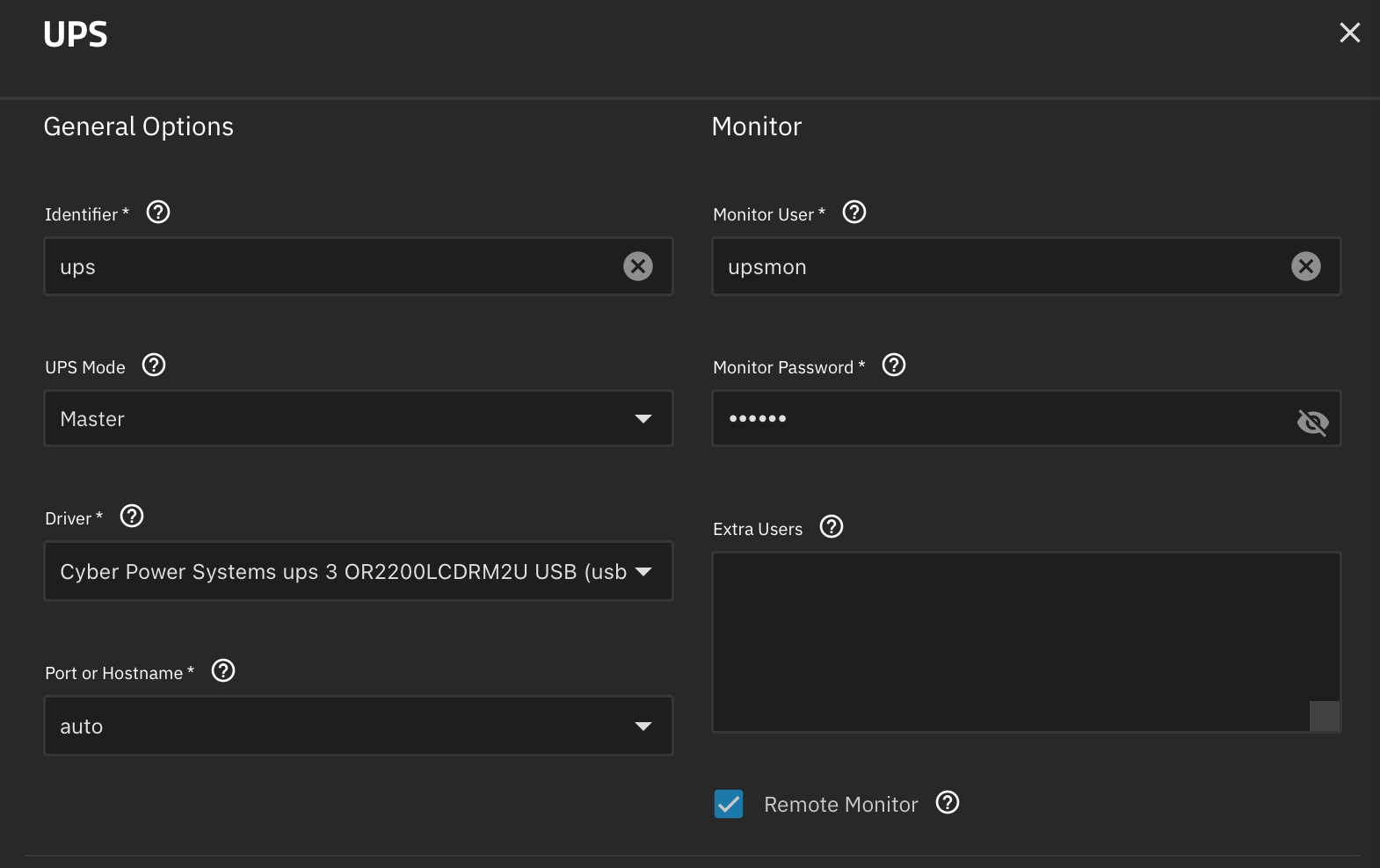
This is the important part:
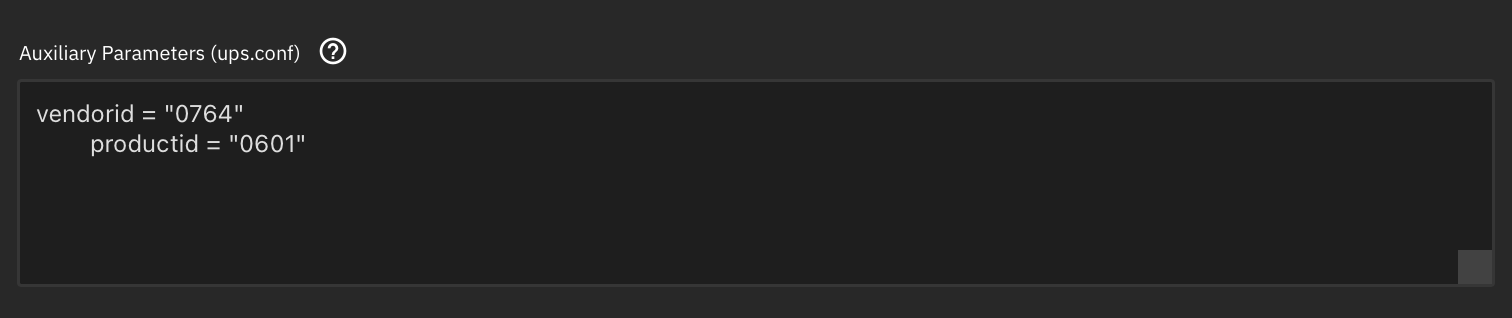
Based on your previous nut-scanner output, you should now add the vendorid and productid like this in the Auxiliary Parameters (ups.conf). You should match the spacing. For my output shown above, vendorid is 0764, and productid is 0601.
Now press Save. Try starting the service. If it errors out and claim no permissions, SSH to your truenas box, and run:lsusb -t
This should give you the Bus and Port number. For example:
  Bus 003 Device 002: ID 0764:0601 Cyber Power System, Inc. PR1500LCDRT2U UPS

  /:  Bus 003.Port 001: Dev 001, Class=root_hub, Driver=xhci_hcd/5p, 480M
      |__ Port 001: Dev 002, If 0, Class=Human Interface Device, Driver=usbhid, 12M
This shows my UPS is on Bus 3, Port 1, Dev 2.
So now run:
sudo udevadm control --reload-rules
sudo udevadm trigger --action=add /sys/bus/usb/devices/3-1 # REPLACE 3-1 with your BUS-PORT accordingly.
sudo udevadm settle
The key here is that after running the udevadm refresh, running ls -la /dev/bus/usb/003/002 where you should replace 003 with your Bus number and 002 with your Dev number should show the group is owned by nut, not root:
% ls -la /dev/bus/usb/003/002
crw-rw-r-- 1 root nut 189, 257 Sep  7 19:45 /dev/bus/usb/003/002
Now you can start the UPS service again, and it should now work!
Member discussion